
Nvidia Stock Bot

🤖 Nvidia Stock Bot - A bot that alerts you in real-time about Nvidia RTX FE GPU stock availability through Discord and/or Telegram notifications.
Note
Github repo is a mirror of https://git.djeex.fr/Djeex/nvidia-stock-bot. You'll find full package, history and release note there. LLM used for bugs check and languages files generation.
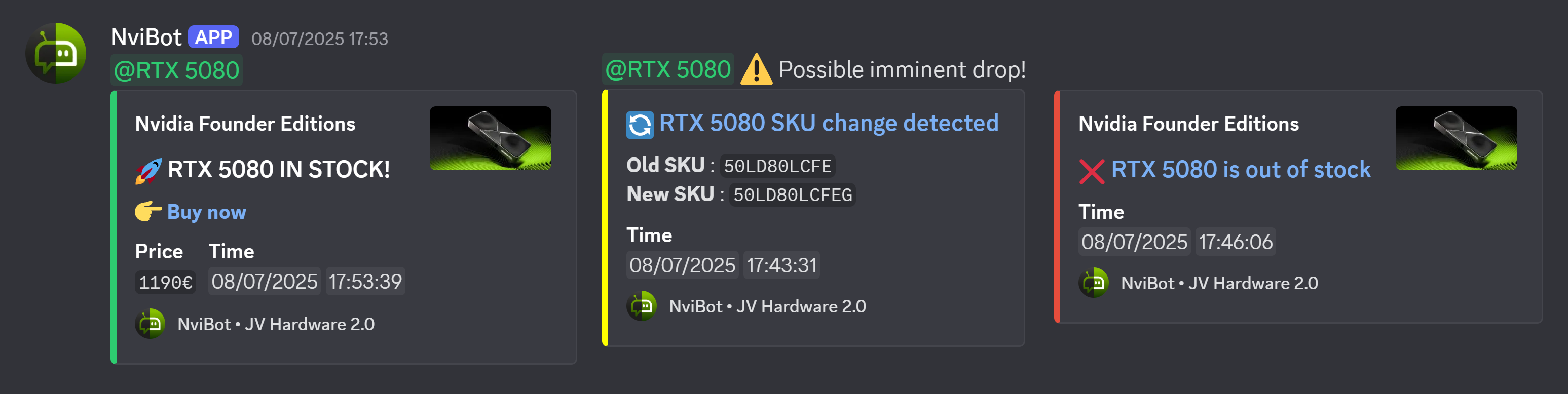
🖼️ Screenshots
📌 Table of Contents
- ✨ Features
- 🐳 Docker Installation without cloning the repo (quick)
- 🐙 Docker Installation with the repo (developer)
- 🐍 Python Installation (developer)
- 📨 Notification channels
- 🐞 Common issues
- ❓ How it works
- 🧑💻 Contributors
✨ Features
- Selectable GPU models
- Selectable country marketplace to check. It will set notifications language and currency accordingly
- Discord
@everyoneor specified role on SKU change (possible imminent drop) - Discord
@everyoneor specified role notification when stock is detected, including model, price, and link - Silent Discord notification when no stock is detected
- Telegram notifications (stock, out of stock, SKU change) in the same language as Discord
- Discord and Telegram are both optional and can be used together or separately
- Selectable notification server name in notification footer
- Selectable check frequency
- Test mode to check without sending notifications
🐳 Docker Installation without the repo (quick)
Below are the instructions to set up the container using our pre-built image. With this setup, your bot will run independently as long as the container is active.
Requirements
Configuration
- Create a folder named
nvidia-stock-bot - Create a
compose.yamlfile inside that folder with the following content:
services:
  nvidia-stock-bot:
    image: git.djeex.fr/djeex/nvidia-stock-bot:latest
    container_name: nvidia-stock-bot
    restart: unless-stopped
    environment:
    # Minimal environment variables
      - PRODUCT_NAMES=                  # Exact GPU name (e.g. 'RTX 5080, RTX 5090')
      - DISCORD_WEBHOOK_URL=            # Your Discord webhook URL (optional)
      - TELEGRAM_BOT_TOKEN=             # Your Telegram bot token (optional)
      - TELEGRAM_CHAT_ID=               # Your Telegram chat ID (optional)
      - COUNTRY=                        # Set your country (e.g. 'US')
      - PYTHONUNBUFFERED=1              # Enables real-time log output
Environment Variables:
| Variable | Description | Possible Values | Default Value |
|---|---|---|---|
PRODUCT_NAMES |
The exact GPU names you're searching for | RTX 5080, RTX 5090 |
|
DISCORD_WEBHOOK_URL |
Your Discord webhook URL. Optional: if empty, Discord notifications are disabled (a warning is logged) | A valid URL | |
TELEGRAM_BOT_TOKEN |
Token of your Telegram bot (created with @BotFather). Optional, must be set together with TELEGRAM_CHAT_ID; if empty, Telegram notifications are disabled (a warning is logged) |
123456:ABC-DEF... |
|
TELEGRAM_CHAT_ID |
ID of the Telegram chat, group or channel receiving the notifications | 123456789, -1001234567890 |
|
COUNTRY |
Your country (only one). API localization, Discord notification currency and language will be set accordingly | GB, US, CA, BE, NL, DK, DE, ES, FR, IT, NO, AT, PL, FI, SE, KR, JP |
US |
DISCORD_SERVER_NAME |
The name of your server, displayed in notification's footer | A text | Shared for free |
DISCORD_ROLES |
List of Discord roles ID in the same order than PRODUCT_NAMES values, found in your discord server settings (with user profile developer mode enabled) |
<@&12345><@&6789> |
@everyone |
REFRESH_TIME |
Script refresh interval in seconds | 60, 30, etc. |
30 |
API_URL_SKU |
API listing the product. Use it for development purpose. Warning : it will override the locale set by COUNTRY. |
An URL | https://api.nvidia.partners/edge/product/search?page=1&limit=100&locale={locale}&Manufacturer=Nvidia |
API_URL_STOCK |
API providing stock data. Use it for development purpose. Warning : it will override the locale set by COUNTRY. |
A URL | https://api.store.nvidia.com/partner/v1/feinventory?locale={locale}&skus= |
PRODUCT_URL |
GPU purchase URL. Use it for development purpose. Warning : it will override the locale set by COUNTRY. |
A URL | https://marketplace.nvidia.com/fr-fr/consumer/graphics-cards/?locale={locale}&page=1&limit=12&manufacturer=NVIDIA |
TEST_MODE |
For testing without sending notifications | True, False |
False |
PYTHONUNBUFFERED |
Enables real-time log output | 1, 0 |
1 |
Run the image
Navigate to the nvidia-stock-bot folder and launch the container:
docker compose up -d
Check logs to verify operation
docker logs -f nvidia-stock-bot
📦 Docker Installation with the repo
Instructions below show how to install the repo, build the Docker image, and launch the container. Your bot will run independently as long as the container is active.
Requirements
Clone and configure
- Clone the repo:
git clone https://git.djeex.fr/Djeex/nvidia-stock-bot.git
- Navigate to
nvidia-stock-botand build the Docker image:
docker build -t nvidia-stock-bot .
- Then go to
nvidia-stock-bot/dockerand edit the.envfile with:- Your Discord webhook URL and/or your Telegram bot token and chat ID
- The API and product URLs
- Stock checking frequency (default: 60s; lowering too much may get your IP blocked by Nvidia)
Run the image
Navigate to nvidia-stock-bot/docker and launch the container:
docker compose up -d
Check logs to verify operation
docker logs -f nvidia-stock-bot
🐍 Python Installation
Instructions to directly run the Python script. Note: the bot stops when you close the terminal.
Requirements
- Python 3.11 or newer
- requests:
pip install requests
Configuration
- Clone the repo:
git clone https://git.djeex.fr/Djeex/nvidia-stock-bot.git
- Navigate to
nvidia-stock-botand create a virtual environment (e.g.,python3 -m venv env_name) - Export the environment variables with your webhook and/or Telegram settings and refresh time, for example:
export DISCORD_WEBHOOK_URL="https://your_discord_url"   # optional
export TELEGRAM_BOT_TOKEN="123456:ABC-DEF"             # optional
export TELEGRAM_CHAT_ID="123456789"                    # optional
export COUNTRY=US
export PRODUCT_NAMES=RTX 5080, RTX 5090
export DISCORD_ROLES=<@&12345>, <@&6789>
export REFRESH_TIME="60"
export TEST_MODE=false
export PYTHONUNBUFFERED=1
- Run the script
python nvidia-stock-bot.py
📨 Notification channels
Discord and Telegram are both optional and independent: configure one, both or none. The bot never stops because a channel is missing. For each channel that is not configured, a warning is written in the logs at startup:
[WARNING] ⚠️ DISCORD IS NOT CONFIGURED: no Discord notification will be sent.
[WARNING] ⚠️ TELEGRAM IS NOT CONFIGURED: no Telegram notification will be sent.
[WARNING] 🚨 NO NOTIFICATION CHANNEL CONFIGURED: the bot will run but will not alert you!
Discord
Set DISCORD_WEBHOOK_URL (and optionally DISCORD_ROLES and DISCORD_SERVER_NAME).
Telegram
- Create a bot with @BotFather and copy its token (
TELEGRAM_BOT_TOKEN). - Send a message to the bot, or add it to your group / channel (as administrator for a channel). Otherwise Telegram rejects the messages.
- Get your chat ID (
TELEGRAM_CHAT_ID), for example by openinghttps://api.telegram.org/bot<TOKEN>/getUpdatesafter writing to the bot. Group and channel IDs are negative (e.g.-1001234567890). - Set both
TELEGRAM_BOT_TOKENandTELEGRAM_CHAT_ID. If only one of them is set, Telegram is disabled and a warning is logged.
DISCORD_SERVER_NAME is also used in the footer of Telegram messages. Discord roles (DISCORD_ROLES) have no effect on Telegram.
Testing the notifications
TEST_MODE=true disables all sending, so it can't be used to check a channel. To send real test messages without touching the Nvidia API, call the notifier from the running container (keep TEST_MODE to False):
docker exec nvidia-stock-bot python -c "
import notifier as n
u = 'https://marketplace.nvidia.com'
n.send_telegram_notification('RTX 5090', u, '1999')
n.send_discord_notification('RTX 5090', u, '1999')
"
🐞 Common issues
Error when trying to reach product API url :
- Custom
API_SKU_URLmay be wrong - Your IP may be blacklisted by nvidia. Try to use a VPN.
- nvidia API may be down
No Telegram message received:
- Check the logs: the Telegram API error (e.g.
chat not found,Forbidden) is displayed there - The bot must have received a message from you, or be a member of the group / channel
TELEGRAM_BOT_TOKENandTELEGRAM_CHAT_IDmust both be set
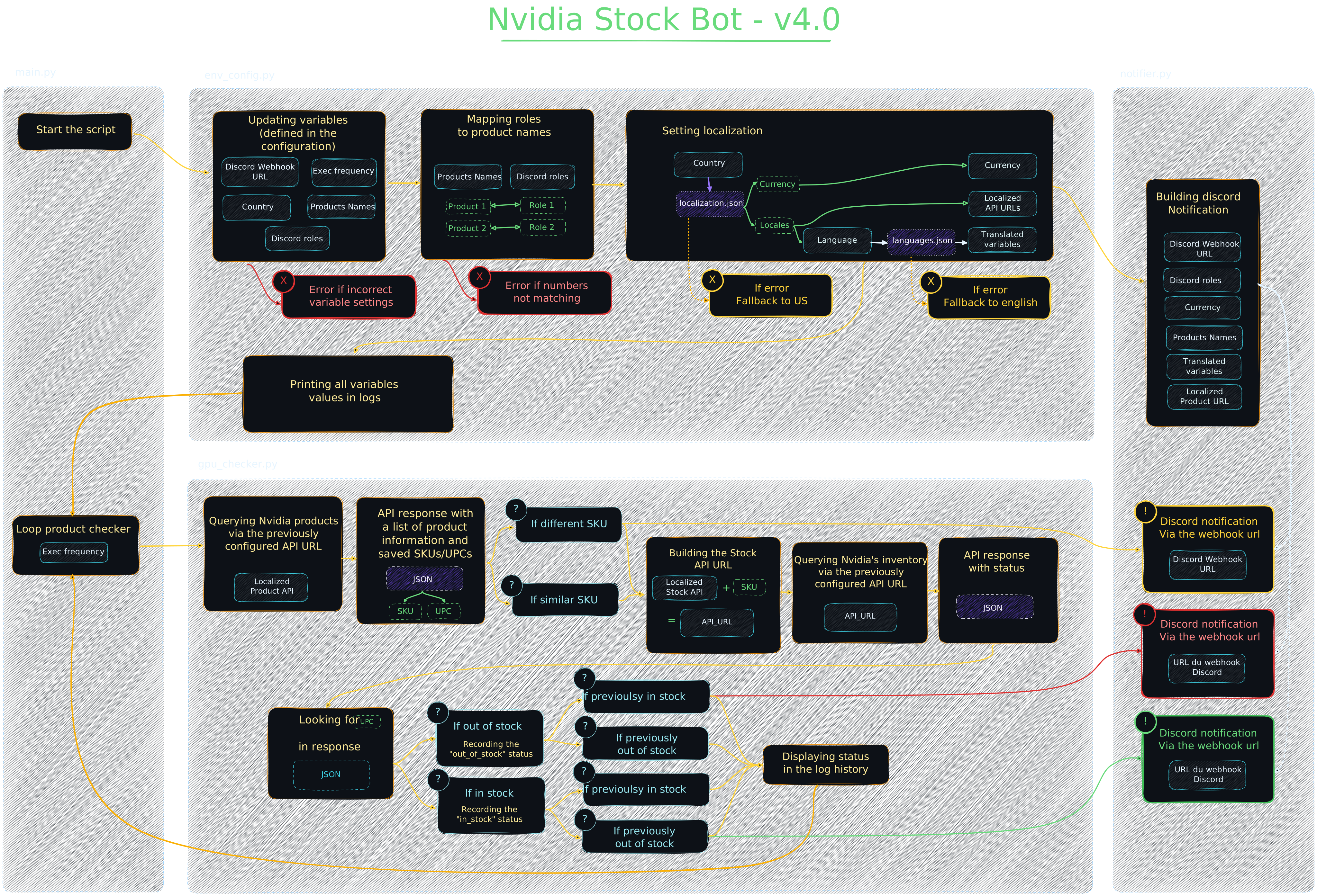
❓ How it works
🧑💻 Contributors
Thanks for their contributions:
- Djeex
- KevOut
- Extreme2pac